A runtime and console for coding agents

The agent said done. The file is missing.

The Harness runs coding agents with explicit permissions and budgets. It records the run and checks the outputs you require before calling it complete.

Get started Read the source

  • Runson your Mac or your servers
  • Drivesclaude, codex, gemini, kimi
  • Keepsevery event, append-only
Documented CLI example
harness run "write resumen.md with three lines about X" --expect resumen.md

incomplete: 6 events recorded
  outstanding: output resumen.md is missing
  the runtime said completed; the closure is derived from what exists
The runtime said completed
The Harness derived incomplete output resumen.md is missing

with fs.write

harness run "write resumen.md with three lines about X" \
    --grant fs.write --expect resumen.md

  17:04:02  started          claude
  17:04:05  asked for        Write(file_path=resumen.md)  [the runtime's own tool]
  17:04:06  came back        177 characters
  17:04:08  spent            in=4 out=330 cache=6457
  17:04:09  finished         succeeded

A separate workspace. A grant allows the write; it does not make an agent produce the file. Two recorded examples, not a prediction.

This example checks for a non-empty file, not the quality of its contents. Both examples in the README

The closure

Two answers to "is it done?"

An agent that reports its own success is a system with no ground truth. The Harness keeps what the model believed beside the closure, never in its place, and says which obligation is still open.

Field What the runtime said What exists
Status completed incomplete
Based on its last message the workspace and the log
resumen.md not looked at missing
Kept as runtime_said, recorded the task's closure

The platform

From a product to a delivered change.

Products hold the work, milestones plan it, runs do it, paths deliver it and the preview shows it. Pick an area.

Each product is a world of its own.

A product keeps its own repositories, sign-ins, MCP providers, runs, memory and spend. Its database rows live under their own scope with row-level security, and every run of it starts with the product's variables and secrets.

  • Start one empty, from GitHub, or by importing a folder.
  • Overview, Milestones, App, Code and Settings on one page.
  • A monthly spending cap, and pushes with the product's own GitHub token.
  • Secrets live in the product's vault; a value a run prints comes back redacted.
harness workspaces create acme-shop
harness workspaces env --workspace acme-shop set STRIPE_KEY --secret

LimitKeeping a product's secrets out of a run's reach holds on Claude; the other CLIs run in sandboxes that do not hide those folders.

Plans you shape, then send.

A plan is a git folder of Markdown owned by the product. You shape it over planner turns, one commit each. Its front matter is the run's contract, and sending it is the approval.

  • standing: true is read first by every run of the product.
  • then: names the milestone sent when this one succeeds.
  • One command plans a whole product: its constitution and every milestone, chained.
  • Plans are archived, never deleted.
harness plans product acme-shop "an online shop for our coffee"
harness plans send checkout-flow

LimitA plan cannot choose its profile; it takes the console's.

Steer a run while it works.

A console run stays open between turns. Write to it, pause it, change the model for the next turn, or ask a side question answered apart. When a turn ends well, a judge with no tools reads the objective and the answer and closes the run, or says what is missing.

  • Claude reads your message live; Codex, Gemini and Kimi pick it up at the next turn.
  • Same account keeps the conversation; another runtime gets a hand-off brief.
  • --decide-alone: the run approves its own plan and a reviewer judges for you.
  • --review: a second runtime reads the changes and can block done.
harness run "…" --open --review
harness answer <task_id> "also update the README"

LimitSteering without interrupting is Claude only. An open run nobody continues ends after a week.

Done means delivered, not typed.

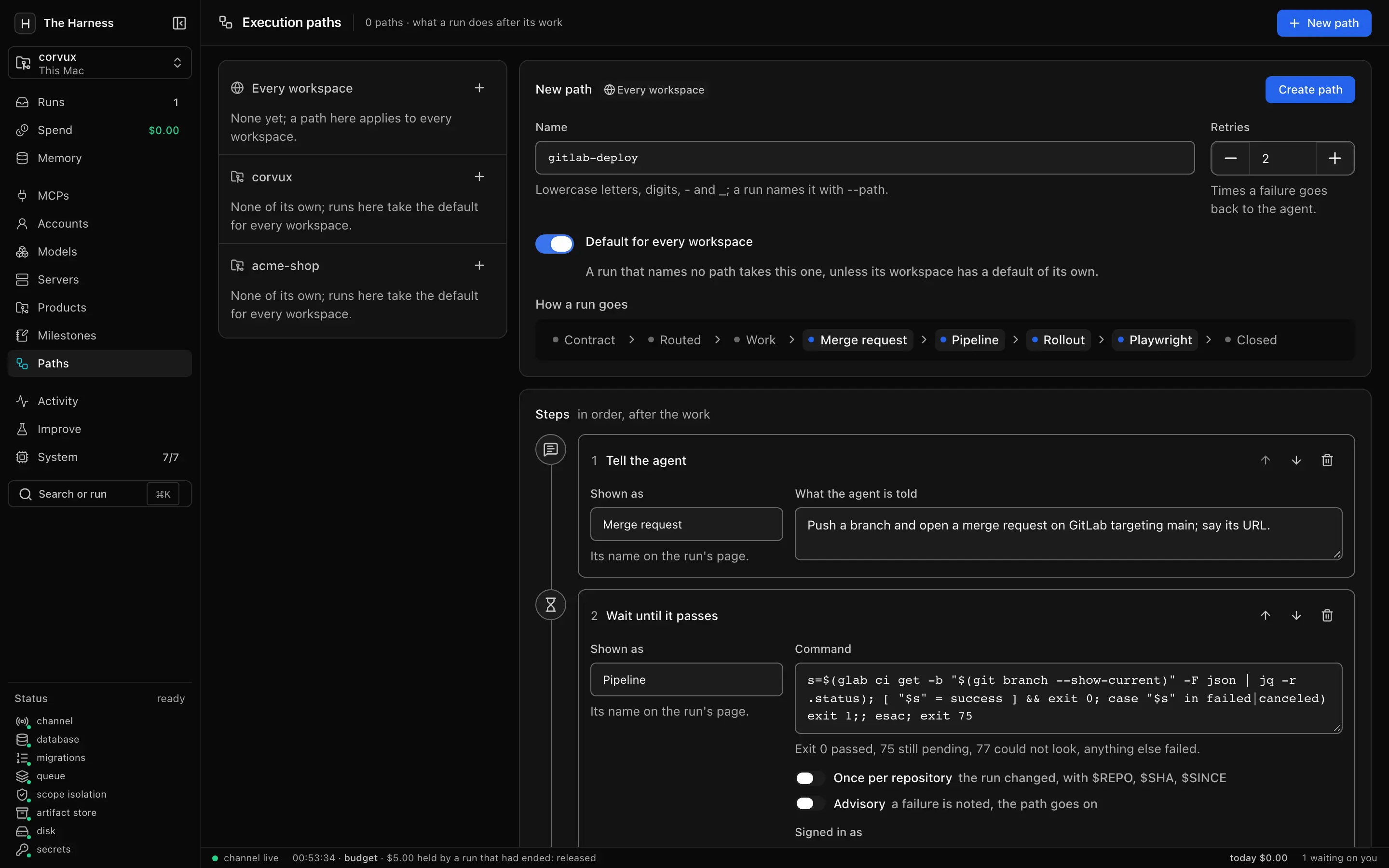
An execution path is the ordered list of steps a run walks after its work: open the MR, wait for CI, wait for the rollout, run Playwright. A failed step goes back to the agent with what it printed, up to the path's retries.

  • Steps: plan, instruct, review, check, wait, acceptance.
  • A wait polls a command: exit 0 passed, 75 still pending, anything else failed.
  • harness probe answers in those codes for landed, actions, kargo, argocd, rollout, http and version.
  • Global, per product, or per run; the Paths page shows deliveries, lead time and change failure rate.
harness run "…" --path gitlab-deploy
harness probe rollout

LimitCI, Kargo and Playwright are commands in steps, not built-in integrations. The agent opens the MR; the harness verifies.

Watch the product change as runs save.

The App tab serves the product's repositories live on your Mac: each service in its own container inside a pod for the product, published on 127.0.0.1, reloading as a run saves. Each repository says how it runs in harness.service.json.

  • Services start in dependency order, with Postgres or Redis when they ask.
  • A film: a screenshot of each preview, per commit.
  • Played on one of your servers as its cluster would run it, with rootless podman over ssh.
  • A run can create the product's GitHub repositories with repo.create.
// harness.service.json
{ "run": "npm run dev", "needs": ["postgres"] }

LimitThe local pod uses Docker; the film needs Google Chrome on the Mac. Previews are off on a shared installation.

A director, its parts, one budget.

Turn on Team and the run's model becomes a director: it plans a graph of parts, each on the model chosen for it, shown wave by wave for approval. Parts run in parallel in their own local clones and are joined on a branch of the run.

  • Agents may spawn helpers: three levels, four children each, eight running in a tree.
  • A helper holds only what its creator holds.
  • The whole tree spends from the director's one budget.
  • The Agents tab draws the tree live.
harness run "…" --team --budget-usd 20

LimitOnly Claude reaches the spawn tools. A tracked file changed but not committed refuses the team.

What runs learn, kept as data.

Runs leave findings with their provenance and can propose facts. Nothing is a fact until a person accepts it, and forgetting revokes a memory and whatever was derived from it.

  • Scoped by tenant, project, principal, task and session.
  • A run that holds memory.read can search it.
  • --remember-for-folder tells a reply to every later run in that folder.
  • Memory cannot grant, spend or redirect anything.
harness run "…" --continue-from <task_id> --remember-for-folder

How a run ends

You state what is owed. The closure checks it.

Four things happen to every run, in this order. Only the last one decides how it ended.

  1. harness run "…"

    Objective

    Your words, plus what the task owes: a file, a command that must pass, a criterion and who judges it.

  2. --grant · --budget-*

    Grants and budget

    Nothing is granted by default. Grants become the tool list the runtime starts with. Limits on tokens, seconds, dollars and tool calls.

  3. control.audit_event

    Recorded execution

    Each event is appended and committed on its own, so a run can be read while it happens and after it crashes.

  4. derive()

    Closure

    Computed from what exists: the step ended and every obligation holds. The worker may not write a task's ending; control does.

Without an obligation nothing is owed, and finishing is the runtime's word.

Isolated environments

Every run in its own room.

Isolation is layered: an organization holds products, a product holds runs, a run holds a shell. Each layer narrows what the next one can reach.

Organization Members with roles owner, admin, member, viewer; a monthly cap. with sign-in
Product Its own scope ws-<name> with row-level security, sign-ins, providers and vault. always
Run An envelope of the secrets it may read, its grants, its budget, its own workspace. always
Shell The CLI's sandbox: home folder denied, workspace and toolchains allowed again. with shell.run

Where runs execute

  1. This Mac done harness launcher starts queued runs, so they outlive the console.
  2. Your servers done One ssh master per server, tunnelling this Postgres; the same harness run, over the line.
  3. Container runner not built Every process of a run inside a real boundary.
  4. Kubernetes Job runner not built A run as a Job in your cluster.

A shared installation (the Helm chart's default) keeps every shell in its sandbox, reaching only package hosts; codex, kimi and shell.logins do not run there, and previews are off.

Today a run's tools are contained, not its process. A real boundary for every process is the container runner, which is not built yet. The runner plan (ADR 0008)

What a run is held to

What a run is held to.

Each piece below is a flag, a table or a process you can read in the source.

Obligations

Checks run after the runtime stops. An independent check is pinned by its sha256 when the run is admitted.

--expect FILE
a file the task owes, non-empty and inside the workspace
--check COMMAND
a command that must pass, run by the harness after the runtime stops
--check-independent PATH
a script pinned by its sha256 when the run is admitted; changed bytes fail the check
--criterion JUDGE: STATEMENT
what must be true, and who decides: check, reviewer or person
--review
a second runtime reads the changes without the run's own account and judges them

Grants

Named per task, repeatable, none by default. shell.run gets the runtime's own sandbox with the home folder denied.

  • fs.read
  • fs.write
  • source.read
  • shell.run
  • net.read

--grant fs.write

Budgets

Limits a run is admitted with. A run that reaches one ends and says which.

  • --budget-tokens
  • --budget-seconds
  • --budget-usd
  • --budget-tools

Illustrative levels

Append-only log

A trigger refuses UPDATE and DELETE on the audit table. A database rule, not a cryptographic proof.

  1. 17:04:02 started
  2. 17:04:05 asked for Write
  3. 17:04:06 came back
  4. 17:04:08 spent
  5. 17:04:09 finished

update control.audit_event set kind = 'rewritten';
ERROR: control.audit_event is append-only

Providers through the bridge

Reading tools only, each call leaving a receipt. A tool that appears after you approved a provider is drift and publishes nothing. Credentials are secret:// references, never values in the database.

  • GitHubrepositories, issues, pull requests
  • Linearissues and projects
  • Context7documentation for libraries
  • Grafanadashboards, datasources, alerts
  • Serenasymbols and references across a repository
  • Argo CDwhat is deployed and whether it is in sync
  • Kargostages, freight and promotions

The console, running

Read the run, not the log.

The console answers what is running, what is waiting on you, what a run produced and what it cost. These are screenshots of it, not mockups.

Recorded from the console in real time, with the scripted runtime standing in for Claude.
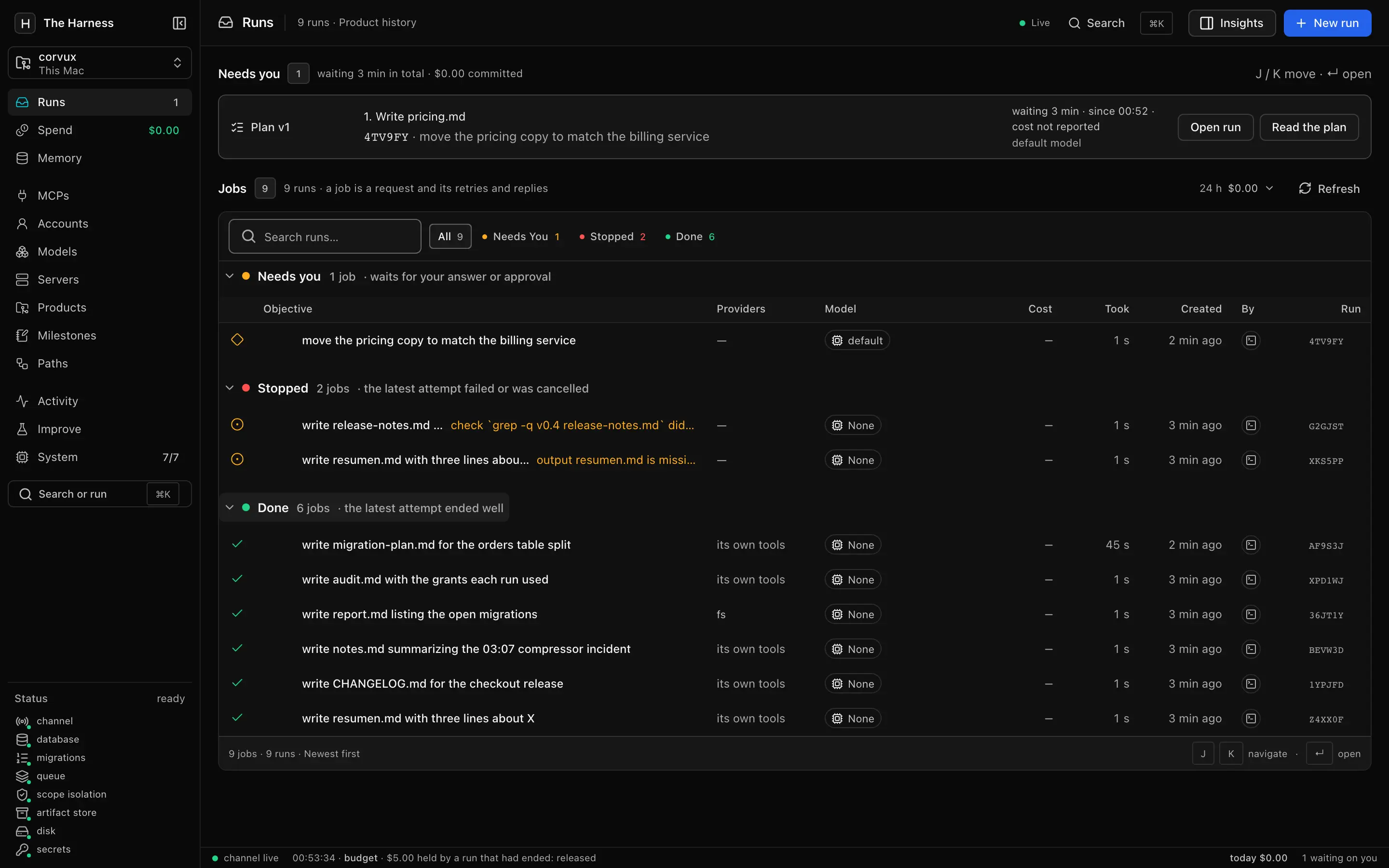
The console: Runs. What needs you first, then every job grouped by how it ended. The plan waiting on approval sits on top.
What needs you first, then every job grouped by how it ended. The plan waiting on approval sits on top. Select the screenshot to open it full size.
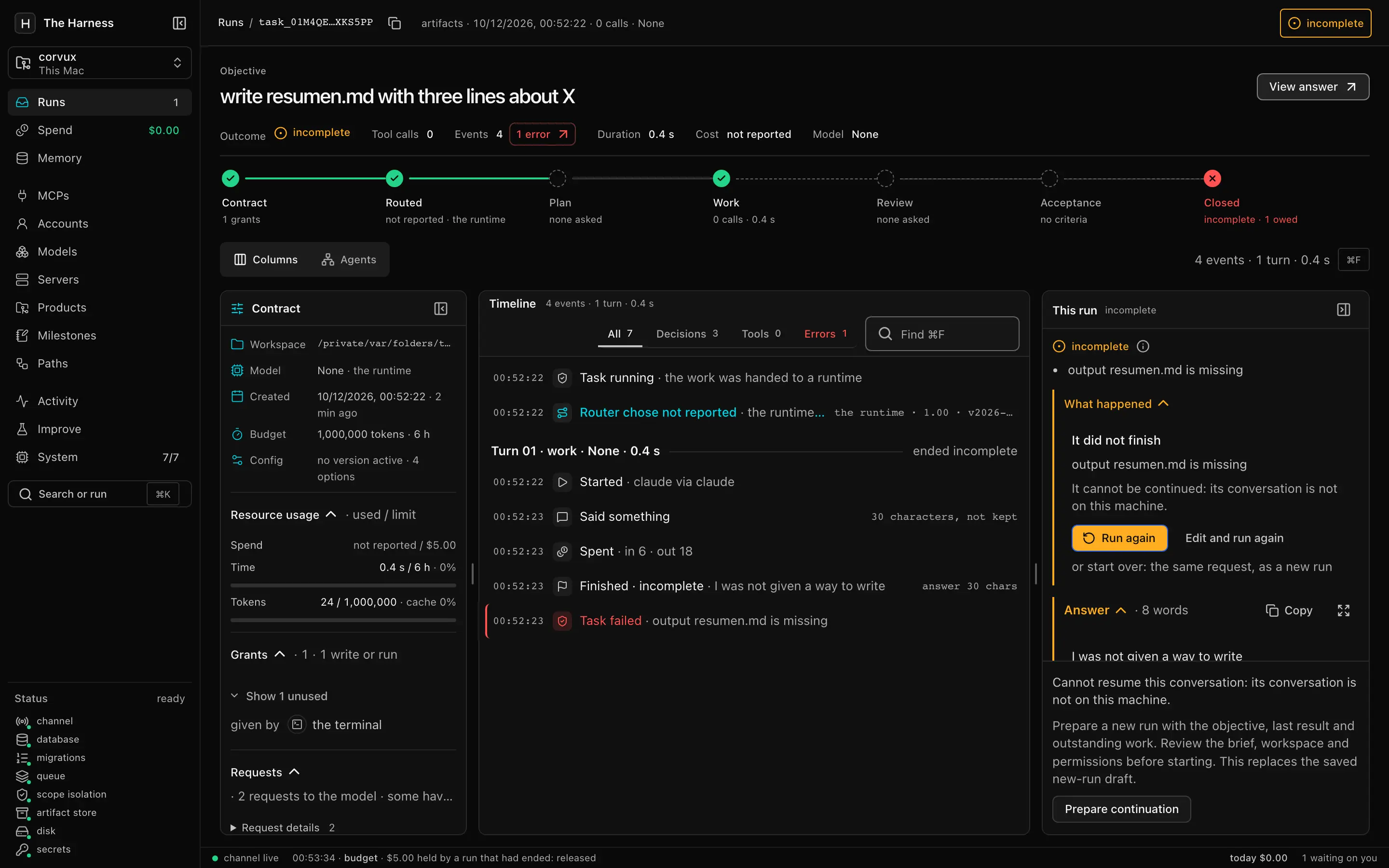
The console: An incomplete run. The runtime finished; the closure says incomplete and names the missing output. Contract, timeline and the reason side by side.
The runtime finished; the closure says incomplete and names the missing output. Contract, timeline and the reason side by side. Select the screenshot to open it full size.
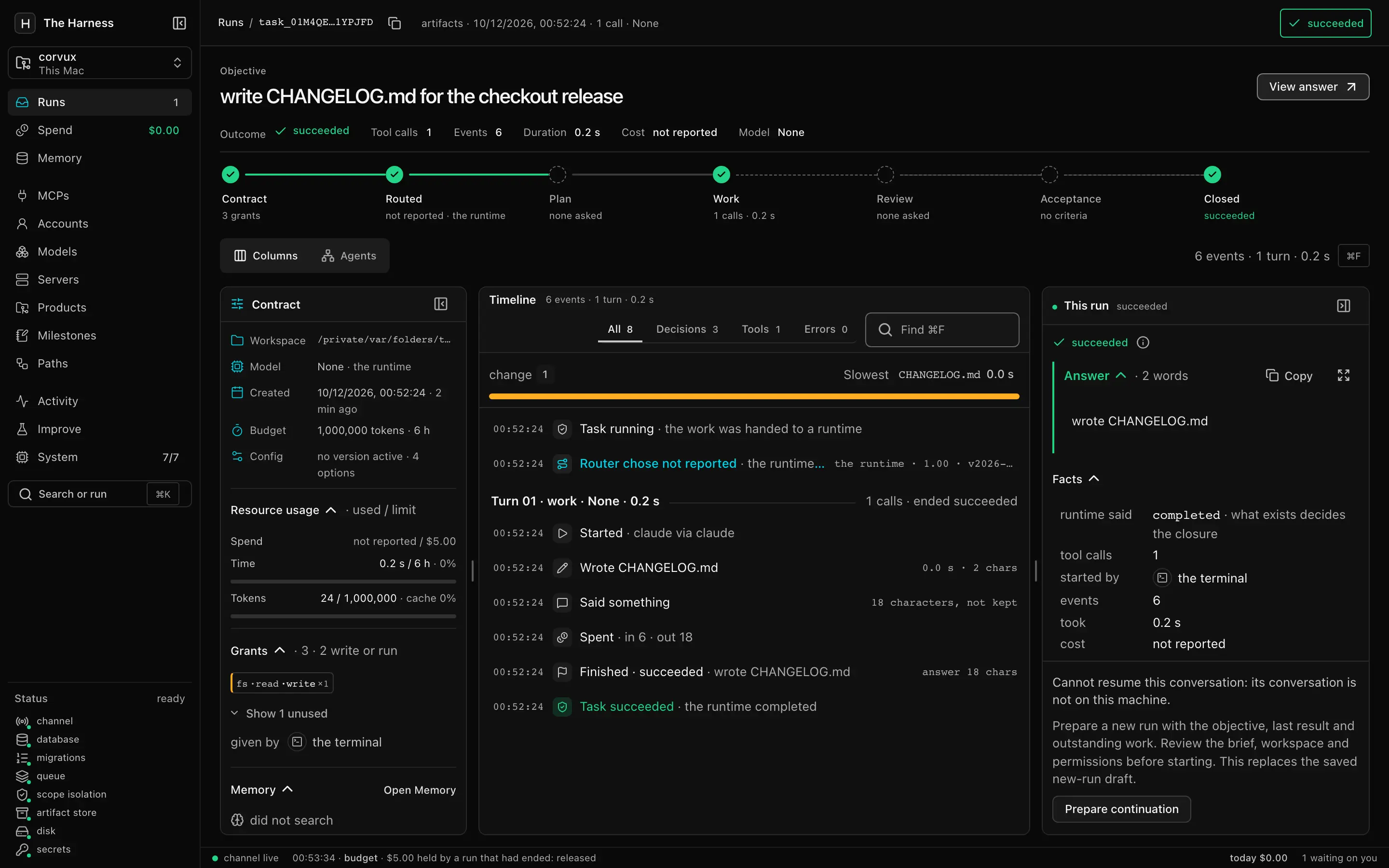
The console: A succeeded run. The lifecycle strip from contract to closed, the file it wrote, and what the runtime said kept as a fact beside the closure.
The lifecycle strip from contract to closed, the file it wrote, and what the runtime said kept as a fact beside the closure. Select the screenshot to open it full size.
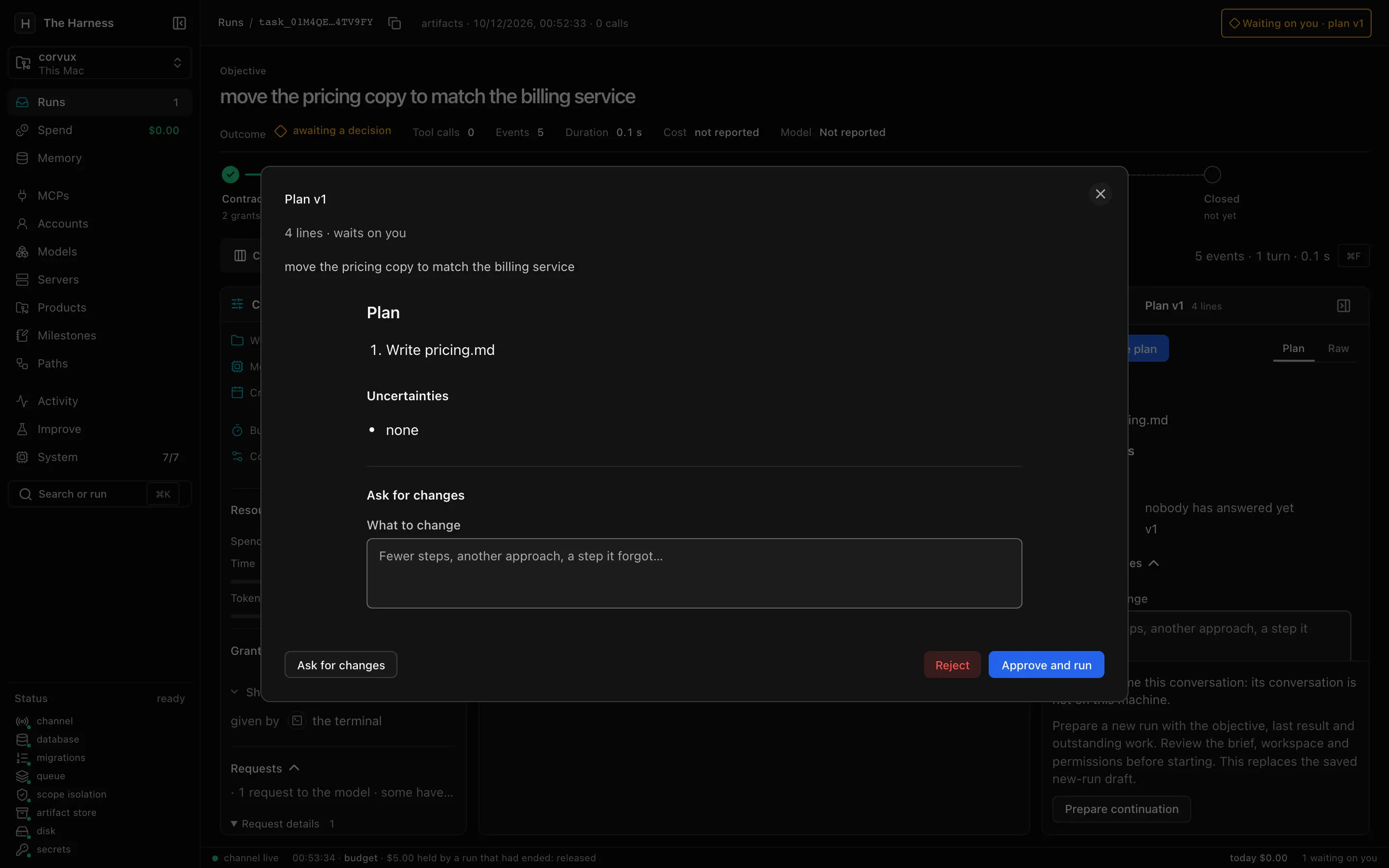
The console: Plan approval. A run that planned first waits for a person: approve and run, ask for changes, or reject.
A run that planned first waits for a person: approve and run, ask for changes, or reject. Select the screenshot to open it full size.
The console: Execution path. The GitLab template: merge request, pipeline, rollout, Playwright. Every command is yours to edit.
The GitLab template: merge request, pipeline, rollout, Playwright. Every command is yours to edit. Select the screenshot to open it full size.
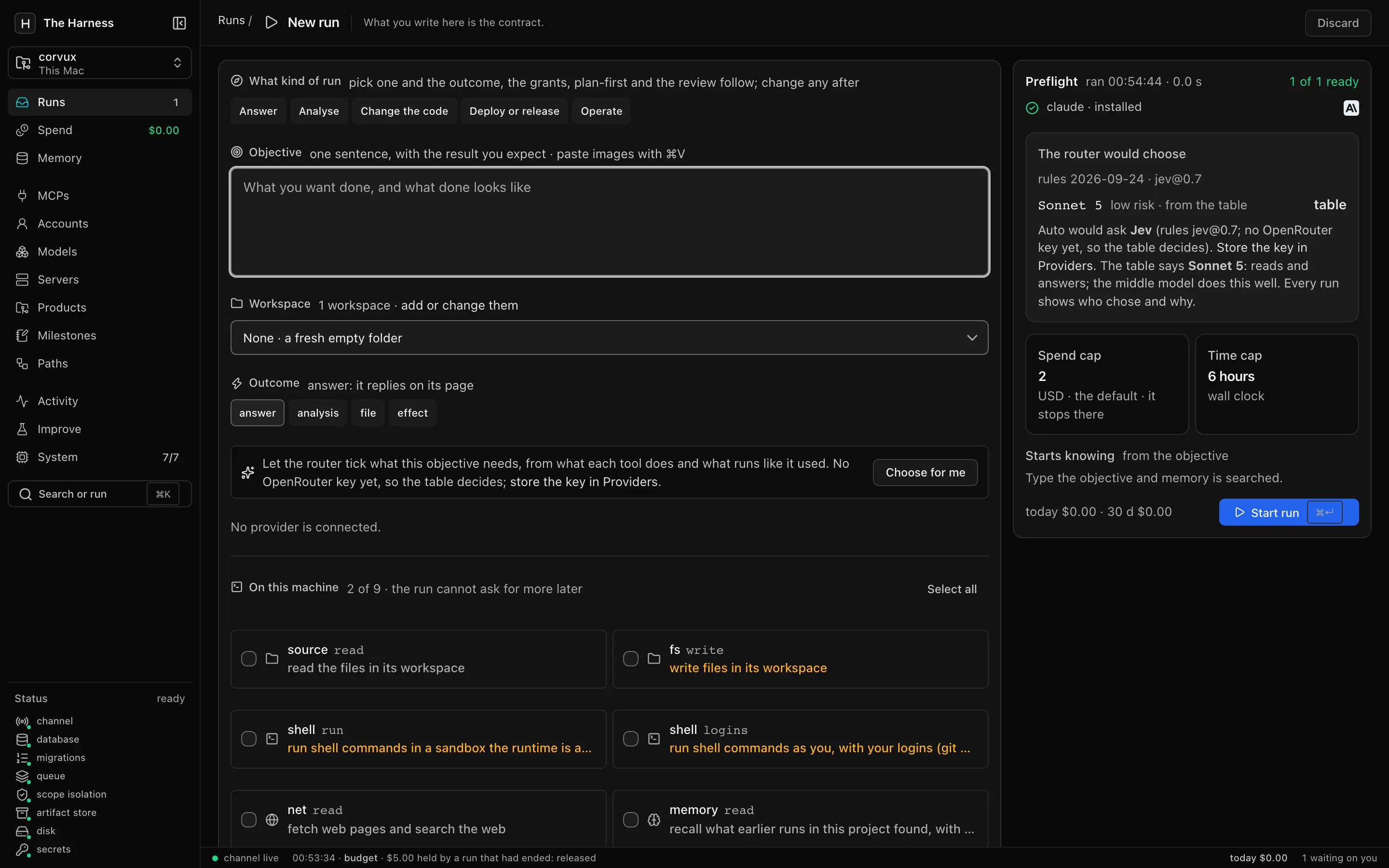
The console: New run. What you write is the contract: outcome, grants, a spend cap and a time cap, with the router's choice explained.
What you write is the contract: outcome, grants, a spend cap and a time cap, with the router's choice explained. Select the screenshot to open it full size.

Real screenshots at d2fddb9 with demo data: a scripted runtime stood in for Claude, so the model reads None and costs read not reported.

In the console, j and k move between rows, Enter opens one and ⌘K opens the palette.

Permissions

What a grant controls, and what it does not.

A granted tool can run in two ways. Each row of the log says which one happened.

Native tools

Who runs the tool
The runtime, in its own process.
When the grant applies
At start: the grants become the tool list the runtime is given.
What the log says
asked for, never authorized
Receipt
None

Bridged tools (--bridge)

Who runs the tool
The Harness, through an MCP server it runs for the length of the run.
When the grant applies
On each call, before the effect, against the path the argument resolves to.
What the log says
what was checked, and what it did
Receipt
One per call

../../etc/passwd refused on where it lands

A bridged write and its receipt, from a separate documented run

tool    | fs.write@1.0.0
status  | success
effect  | applied
receipt | {"reference": "/…/informe.md"}

Source

Limits, stated plainly

  • This contains the tools, not the process. Unless you name allowed domains, a run's shell can reach any host.
  • shell.run uses the runtime's own sandbox. Linux needs bubblewrap and socat for it; without a sandbox the run fails instead of running the shell unsandboxed.
  • The audit table refuses UPDATE and DELETE through a database trigger. Whoever administers the database can change that.
  • Capabilities differ by runtime. Codex and Kimi are admitted only with the grants their own behavior needs.

What the grants do, and do not do

Runtimes and cost

It drives the agent CLI you already use.

The Harness runs an agent CLI on your machine, with your account for that CLI. It does not supply a model. Each CLI is pinned to an exact version, and the doctor checks it.

  • Claude claude pinned 2.1.290 The runtime of every example on this page.
  • Codex codex pinned 0.159.2 Runs commands in its own sandbox, so it is admitted only with shell.run.
  • Gemini gemini pinned 0.62.0 Adapter present. Not shown in an example here.
  • Kimi kimi pinned 0.36.1 Runs every tool on its own in prompt mode, so it is admitted only with shell.run and fs.write.

Pinned versions in toolchain.toml

Each cost keeps its source.

A figure the runtime reported, an estimate from a price table, or unknown. Unknown stays unknown and is counted as unreported, never as $0.

Three kinds of cost figure. Illustrative values.
KindShown asMeaning
Reported$0.41The runtime's own figure for the turn.
Estimated≈ $0.38Tokens priced from the table for that model and date.
UnknownunknownNo figure and no price. Counted as unreported.

Every run has a spending cap by default; products and organizations can keep to a monthly one. --model auto is chosen at the door by a table or a router model.

Operate it

Runs on your machine. Grows onto your servers.

What an operator needs to keep it running without watching it.

Alerts are set by environment variables; the Helm chart runs one console pod and does not scale out.

Install

Install it and run the example.

Checked on macOS with the commands below, using a scripted runtime in place of Claude. Linux uses the same commands; there, shell.run also needs bubblewrap and socat, and this page has not checked that path.

  1. Get the code and start Postgres

    git clone https://github.com/andresgarcia29/the-harness
    cd the-harness
    uv sync
    docker compose up -d --wait
  2. Keep the two secrets in files

    Each file is created only if it is absent, readable by you alone. The database URL is the local compose default. The files keep the secrets out of the environment every child process can read.

    dir=~/.config/harness-secrets
    mkdir -p "$dir" && chmod 700 "$dir"
    [ -e "$dir/database_url" ] || (umask 077; printf %s 'postgresql://harness:harness@127.0.0.1:55433/harness' > "$dir/database_url")
    [ -e "$dir/token_secret" ] || (umask 077; openssl rand -hex 32 | tr -d '\n' > "$dir/token_secret")
    export HARNESS_DATABASE_URL_FILE="$dir/database_url"
    export HARNESS_TOKEN_SECRET_FILE="$dir/token_secret"
  3. Apply the migrations and ask the doctor

    Each check reads ready, missing or unknown. A line that is not ready says what to do next, and unknown is not ready.

    mkdir -p artifacts
    .venv/bin/harness control --once
    .venv/bin/harness doctor
  4. Run the objective in two new workspaces

    Expect incomplete for the first, with output resumen.md is missing. The second may write the file: the agent decides. The real runs call Claude.

    without=$(mktemp -d)
    .venv/bin/harness run "write resumen.md with three lines about X" \
      --workspace "$without" --expect resumen.md
    
    with=$(mktemp -d)
    .venv/bin/harness run "write resumen.md with three lines about X" \
      --workspace "$with" --grant fs.write --expect resumen.md
    ls "$with"
  5. Read it back

    show prints the last run. The console prints a local address with a one-time admin token and opens it.

    .venv/bin/harness show
    npm --prefix web ci && npm --prefix web run build
    .venv/bin/harness console

Questions

Questions

What does succeeded mean?

The step ended and every obligation holds: each expected file exists and each required check passed. Without an obligation, succeeded means the runtime finished. Source: src/harness/control/completion.py

What does --expect check?

That a non-empty regular file with that name is inside the workspace when the run closes. It does not judge the contents, and it does not prove this run wrote the file. Start each example in a new workspace. Source: src/harness/worker/service.py

Is a grant a sandbox?

No. Native grants shape the tool list a runtime starts with. The bridge checks each call it carries. Neither contains the process or its network. Source: README.md

Which runtimes are supported?

There are adapters for claude, codex, gemini and kimi. Each has its own capabilities and admission rules, and the examples here use Claude. Source: src/harness/worker/backends/external/cli.py

What happens if a run crashes?

Each event is committed on its own, so what was written stays readable. A detached task held by a worker that dies is taken over when its lease expires. Source: docs/install.md

Where do data and credentials live?

In the Postgres you run and in files you own. A provider credential is stored by name as a secret:// reference, never as a value in the database. Source: docs/install.md

Give it an objective. Inspect the result.

Get started Read the source